Hi Guys&Girls
Just got this information from one of our friends on the 718 forum.
He has found and purchased a reasonable priced diagnostic tool that can read your oil ash % levels.
Enclose his detailed post for your attention.
I received a £70 ThinkDIag OBD2 scanner yesterday and can confirm that this device will show the GPF ash load etc data on a 718. Device was tested on a MY2022 base 718 2L Cayman.
The menu system on this reader is somewhat obscure. The route to read the GPF data is as follows:
Connect to the ThinkDiag dongle and select 'All Systems Diagnostic'. Let the app connect to the dongle, search for the VIN, confirm the car make/model etc and then:
System Selection
DME (Engine Electronics)
Read Data Stream
K_Catalytic converter
check boxes for the following:
K210_Particulate filter, bank 1 - loading level
K211_Particulate filter, bank 1 - soot load calculated
K221_Particulate filter, bank 1 - soot load measured
K230_Particulate filter, bank 1 - oil ash load calculated
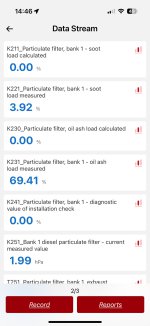
K231_Particulate filter, bank 1 - oil ash load measured
This will return readings for the above. You can then save the readings in a pdf report within the ThinkDiag app.
I had a quick look around the menus to see if this value could be reset via the ThinkDiag. I couldn't see any obvious route to this; however I did note that in the 'Special Functions' section of the DME module there is a menu option to initiate a GPF re-generation. I didnt try this.
At least this way owners can monitor their own K231 ash load values over time rather than having to rely on OPCs to (maybe) give them the data, and at cost.
Thanks again to our friend on the 718 forum
Regards
Dave
Just got this information from one of our friends on the 718 forum.
He has found and purchased a reasonable priced diagnostic tool that can read your oil ash % levels.
Enclose his detailed post for your attention.
I received a £70 ThinkDIag OBD2 scanner yesterday and can confirm that this device will show the GPF ash load etc data on a 718. Device was tested on a MY2022 base 718 2L Cayman.
The menu system on this reader is somewhat obscure. The route to read the GPF data is as follows:
Connect to the ThinkDiag dongle and select 'All Systems Diagnostic'. Let the app connect to the dongle, search for the VIN, confirm the car make/model etc and then:
System Selection
DME (Engine Electronics)
Read Data Stream
K_Catalytic converter
check boxes for the following:
K210_Particulate filter, bank 1 - loading level
K211_Particulate filter, bank 1 - soot load calculated
K221_Particulate filter, bank 1 - soot load measured
K230_Particulate filter, bank 1 - oil ash load calculated
K231_Particulate filter, bank 1 - oil ash load measured
This will return readings for the above. You can then save the readings in a pdf report within the ThinkDiag app.
I had a quick look around the menus to see if this value could be reset via the ThinkDiag. I couldn't see any obvious route to this; however I did note that in the 'Special Functions' section of the DME module there is a menu option to initiate a GPF re-generation. I didnt try this.
At least this way owners can monitor their own K231 ash load values over time rather than having to rely on OPCs to (maybe) give them the data, and at cost.
Thanks again to our friend on the 718 forum
Regards
Dave


 ) from Reading had returned back to their centre of excellence(