Getting Involved with Porsche Club GB Sim Racing
Porsche Club GB Sim Racing has a Discord server that brings all competitors together. It serves as the hub for discussions and communication, with various channels dedicated to different topics.
Once you have joined, you will initially be assigned the role of ‘new member.’ To participate in our championships, you will need to verify your PCGB membership by sending your details to BernieBot via Discord.
Go to the “general-chat” channel and check the pinned messages (there is a little grey pin icon near the top-right of the window). Instructions on how to chat to BernieBot can be found there. If you encounter any issues, post a message in either the general-chat or help-and-advice channels, and a member of the community will be happy to assist.
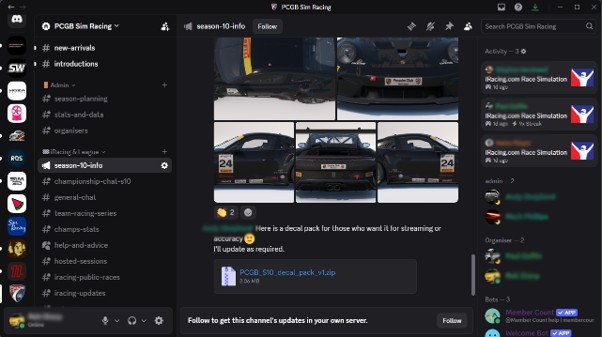
Below is a screenshot of Discord taken from a PC. The left-hand menu displays a list of channels. In this example, the Season 10 Info section is selected, but other key channels include:
- championship-chat-s10 – discussions relating to the current season.
- general-chat – a place to chat about anything with fellow members.
- champs-stats – the latest championship standings and race results
- hosted-sessions – information about fun, non-championship races, and events.
The example displays the latest posts for the selected channel, in this case Season 10 Info. Here, competitors are being reminded to ensure their cars can display sponsor graphics. The panel on the right shows who is currently active, along with organisers and other members.
As new seasons begin, channels such as those for Season 10 will be replaced with equivalent Season 11 channels.
Information on iRacing membership, required content, and getting started with Porsche Club GB Sim Racing can be found
here.