You should upgrade or use an alternative browser.
Porsche dash cam useful info
- Thread starter cymro
- Start date




Should be no problem as long as you switch off your blue tooth to disable it to connect to the car 5G WiFi. Once you have finished just turn on the Bluetooth again.Thanks for the information on this issue. I recently had a Porsche dash cam installed on my 992.1. The initial connection to the App was a bit of a carry on. I am now a bit concerned about reconnecting the dash cam should I disconnect in order to connect Car Play. I therefore have Car Play connected via a USB cable. I'd be interested to know if this is the generally held opinion, ie once the dash cam is connected to the App, leave it alone. Thanks, Nigel

On my new 992.2GTS I purchased the front and rear car dash cam option and decided fit it myself rather than pay over £500 to have it fitted. The new cars now come with the prewired option, although you still have to purchase the harnesses for both cameras and remove some facias to locate the connectors. It is a bit fiddly to fit but there are good informations available on the web. After fitting you still have to go into dealer mode to set up the camera for the type of battery for the car and the duration the radar is on, maximum 1 hour. I struggled a bit to find how to go into dealer mode for the camera.
To activate dealer mode:
Remove SD card
Plug camera backing the mount after removing it it.
Hold the power button down until you hear two audible beeps.
Both lights will come on the read and the yellow
Connect to your Dashcam using a lap top or iPad using the WIFI on 324B6D or similar
Type in 192.168.1.1/diagnostics on your browser, and bingo you, just follow then the instructions on the screen.
During normal operation and trying to access the camera files from the Dashcam software on your phone, disable bluetooth on your phone ,otherwise the software keeps trying to connect to the car internal Porsche network due to apple car play.
Hi Huw,On my new 992.2GTS I purchased the front and rear car dash cam option and decided fit it myself rather than pay over £500 to have it fitted. The new cars now come with the prewired option, although you still have to purchase the harnesses for both cameras and remove some facias to locate the connectors. It is a bit fiddly to fit but there are good informations available on the web. After fitting you still have to go into dealer mode to set up the camera for the type of battery for the car and the duration the radar is on, maximum 1 hour. I struggled a bit to find how to go into dealer mode for the camera.
To activate dealer mode:
Remove SD card
Plug camera backing the mount after removing it it.
Hold the power button down until you hear two audible beeps.
Both lights will come on the read and the yellow
Connect to your Dashcam using a lap top or iPad using the WIFI on 324B6D or similar
Type in 192.168.1.1/diagnostics on your browser, and bingo you, just follow then the instructions on the screen.
During normal operation and trying to access the camera files from the Dashcam software on your phone, disable bluetooth on your phone ,otherwise the software keeps trying to connect to the car internal Porsche network due to apple car play.
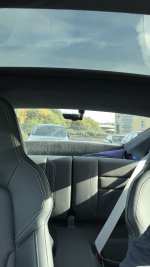
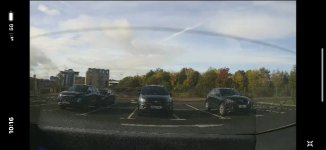
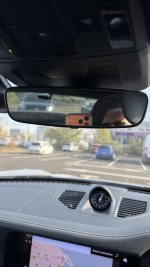
Thank you for the information and the supporting photos.
I am mulling over the dash cam for my 992 and I am leaning towards the front dash cam rather than front and rear, as I am not sure how obtrusive the rear dash cam would be. I think tucking the front dash cam tight under the rear view mirror I would not really see it when driving, but think the rear dash cam would stick out.
Any observations please having lived with the dash cams for a while please?
Many thanks,
Tim
Against
The quality is not so good as the front camera, it is a Lower resolution.
To view the rear camera files you have to use the Porsche Dashcam app on the phone.
The file that is created incorporates both the cameras on one file, if it was downloaded to a viewer on your PC it will only show the front camera only. I have not found suitable software that will play both cameras on your computer.
Attachments

There are recurring threads about whether you can put a bigger microSD in the factory dash cam than the 32GB card Porsche ships it with (or pay over the odds for 64GB) . Officially Porsche spec a 32GB Class 10 MLC card formatted FAT32. But several people have reported success with 128GB, and mixed results with 256GB (most US-based boards). I got curious enough to actually pull it apart. Posting the findings here since it seems relevant to a few threads.
Short version: the 32GB/FAT32 spec is the tested and warrantied config, not a hardware limit. The actual firmware has full exFAT and SDXC support built in. The variability people see is almost certainly down to how the card gets formatted and card quality, not a real capacity ceiling.
The detail:
FCC filings show the unit is made by Mobile Appliance, Inc. (Korea) and is an identical rebadge of the Audi "Universal Traffic Recorder" (UTR2.0) — same PCB silkscreen, same platform, just different branding for VW Group.
Pulled the actual Porsche companion app APK off my phone and unzipped it. Turns out the app bundles the full firmware image as a plain asset file (DashcamFW.muf, ~39MB).
- Ran string analysis on the firmware binary (read-only, nothing executed) and found:
- The video SoC is an iCatch SPCA6500 — a real, documented Taiwanese DVR chip.
- The firmware ships a complete exFAT driver (60+ functions: mount, format, read/write, the works), not just FAT32.
- It explicitly detects SDSC/SDHC/SDXC card classes and has an automatic filesystem-selection routine — it doesn't just default to FAT32.
- No hardcoded capacity ceiling anywhere in ~192,000 extracted strings. Only capacity-related warnings are at the small end (sub-2GB cards) and a 4GB-per-file boundary that's irrelevant since recordings are already chunked into short segments.
- Get a high-endurance card, not a bargain one — continuous loop-recording chews through write cycles. Samsung PRO Endurance or SanDisk Max Endurance, UHS-I U3/V30 minimum.
- Format exFAT on your PC first (Windows: right-click → Format → exFAT, default allocation size. Mac: Disk Utility → Erase → exFAT → MBR scheme, not GUID).
- Once it's in the car, run the device's own Format option once too — its own format pass sets up whatever internal index/config files it expects beyond a raw exFAT volume.
- Test with a short recording before trusting it for real, then let it loop for a day or two and check for gaps.
Sources:
- FCC ID WHBUTR2: https://fccid.io/WHBUTR2
- https://www.dashcams.co.uk/post/porsche-tequipment-front-mounted-dash-cam
- linux-hardware.org iCatch SPCA6500 entry: https://linux-hardware.org/?id=usb:2aad-6501
Posts made and opinions expressed are those of the individual forum members
Use of the Forum is subject to the Terms and Conditions
Disclaimer
The opinions expressed on this site are not necessarily those of the Club, who shall have no liability in respect of them or the accuracy of the content. The Club assumes no responsibility for any effects arising from errors or omissions.
Porsche Club Great Britain gives no warranties, guarantees or assurances and makes no representations or recommendations regarding any goods or services advertised on this site. It is the responsibility of visitors to satisfy themselves that goods and/or services supplied by any advertiser are bona fide and in no instance can the Porsche Club Great Britain be held responsible.
When responding to advertisements please ensure that you satisfy yourself of any applicable call charges on numbers not prefixed by usual "landline" STD Codes. Information can be obtained from the operator or the white pages. Before giving out ANY information regarding cars, or any other items for sale, please satisfy yourself that any potential purchaser is bona fide.
Directors of the Board of Porsche Club GB, Club Office Staff, Register Secretaries and Regional Organisers are often requested by Club members to provide information on matters connected with their cars and other matters referred to in the Club Rules. Such information, advice and assistance provided by such persons is given in good faith and is based on the personal experience and knowledge of the individual concerned.
Neither Porsche Club GB, nor any of the aforementioned, shall be under any liability in respect of any such information, advice or assistance given to members. Members are advised to consult qualified specialists for information, advice and assistance on matters connected with their cars at all times.