You should upgrade or use an alternative browser.
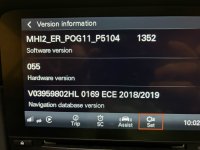
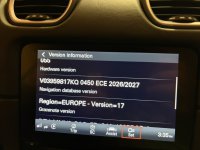
Map Update Success from 18/19 to 25/26
- Thread starter w00044
- Start date

Arcam-Storm
Member
100% they should have, DM sent.
Replied, other than the maps being old I can't fault them to be honest.

Arcam-Storm
Member
With a subscription (I have two years from new) you are allowed to update 3 maps, now the advisor could not tell me if that was per quarter/ half year / yearly etc but he did say that once those three downloads are used then the only way you get an update offered is if the vehicle is in the country that an update is available for and that the vehicle has had "30-40" ignition cycles with at least 5 minutes between each cycle. I was in Spain recently on a road trip for 8 days and I can't say if I met that criteria for sure but I must have been close. If would be interesting to know if anyone could expand further on these updates.
Navigation & Infotainment Services | Porsche Connect Store United Kingdom
 connect-store.porsche.com
Actually says select the regions that are relevant to you…. So I guess you could update everything?
Arcam-Storm
Member
Unfortunately not, you can only select three in total, whether you do it one at a time or in one go. In my handbook and online help it states 3 updates are allowed but does not elaborate further.Who knows, according to here it’s twice a year for online map updates!!
Navigation & Infotainment Services | Porsche Connect Store United Kingdom
The Porsche Connect Store is the platform for prospects and customers to get all the details they need about Porsche Connect services.
Actually says select the regions that are relevant to you…. So I guess you could update everything?

Arcam-Storm
Member
Happy to try and walk you through the update, DM me your number. I do not have the Car Connect option either and for the map updates you do not need to use that, if you did you could always tether the car from your own mobile. The other option is to download a full set of the latest maps and update your car from a SD cardI'm fascinated by this. For my Oct 25 car there appears to be a map update available but how the BH do you make it happen? When I tried, my PCM told me I had to be connected to a wireless network and there isn't one in my garage. At my OPC "Masterclass" I was told that over the air updates (ie via mobile network) aren't available for 718, so it isn't possible for me to update the maps from the car. If anyone has a car that has Porsche Car Connect (that's the basic connectivity which is free for a year), how do you update the maps please?

I'm fascinated by this. For my Oct 25 car there appears to be a map update available but how the BH do you make it happen? When I tried, my PCM told me I had to be connected to a wireless network and there isn't one in my garage. At my OPC "Masterclass" I was told that over the air updates (ie via mobile network) aren't available for 718, so it isn't possible for me to update the maps from the car. If anyone has a car that has Porsche Car Connect (that's the basic connectivity which is free for a year), how do you update the maps please?
According to online if you have the Porsche Car Connect you can do over the air, but i'm still awaiting mine to be activated to test that so did the download to SD card.
See my post at the top, but basically go here:

MIB-Helper.com - VAG Infotainment System toolset
 mib-helper.com
Enter your software number - should begin MH12_ER......
That will then give you details of the latest maps to download for your car/software. Add to an SD card formatted to FAT32 put in and do the update (i'd have to go back to the screen to give you the keystrokes, but whilst on NAV hit the option button and in there somewhere)
For mine I took the EU Full update for 26/27. There was also ROW 2026, Japan 2024, Taiwan 2024 and North America 24/25.
Took about 45 minutes, whilst it updates you cannot use the nav, best to do either when on a long drive or when on a battery tender. That said it can stop and start so if you switched off half way through it'd just pick up again when you next start the car (that would hurt my OCD though so did all in one go).
Arcam-Storm
Member

Yes, it's useless. I subbed to Porsche Connect Nav and Infotainment Services because the advertising is misleading, "Select the regions that are relevant to you twice a year and initiate a map material update", yet found I could only update 3 regions.Unfortunately not, you can only select three in total, whether you do it one at a time or in one go. In my handbook and online help it states 3 updates are allowed but does not elaborate further.
Complained to Porsche under Consumer Rights Act as that's not disclosed in the online material, and they refunded me for the whole year but let me keep the service. In that year, I was only offered a single update and that was a total of 3 regions, which is useless as I live in the UK and have 2 holiday homes in Europe, so cover a lot of regions when I drive there and back plus road trips.
Yes, it's useless. I subbed because the advertising is misleading, "Select the regions that are relevant to you twice a year and initiate a map material update", found I could only update 3 regions. Complained to Porsche under Consumer Rights Act as that's not disclosed in the online material, and they refunded me for the whole year but let me keep the service. In that year, I was only offered a single update and that was a total of 3 regions, which is useless as I live in the UK and have 2 holiday homes in Europe, so cover a lot of regions when I drive there and back plus road trips.
On Audi they block your ability to update the maps unless you subscribe, don't know if thats the same with Porsche? The Audi forums *(and the MIB helper) found a way to amend the relevant FEC code so that you get lifetime updates (like here just downloading them onto an SD Card).
On Audi they block your ability to update the maps unless you subscribe, don't know if thats the same with Porsche? The Audi forums *(and the MIB helper) found a way to amend the relevant FEC code so that you get lifetime updates (like here just downloading them onto an SD Card).
Yes, unless you sub the maps remain static.
I downloaded (from the WWW mentioned about) all the maps and the code which removes the lock, put them on SD card, and updated them all in about 40 mins. Next time I only need the maps not the code.
Porsche make great cars but their infotainment systems have always been trash but, as they are intertwined with the car, I tend to live with it.
I tried the MIB process but after putting in my MH12 …. number it said it was invalid. Odd. However, just for a laugh I went back to the car and this time the update process allowed me to select 3 regions and started downloading. I didn’t have the engine running and the process stopped after about 15mins when the system powered down. It restarted each time I put the key in, then stopped, etc. It appeared to have completed the download and then told me to park the car for installation to complete! That message was still there last time I looked, but the map version now has a 2026 reference not 2024, so something seems to have happened. I may try the MIB process again sometime to get the whole map set if I can overcome the invalid message. I found a 911uk.com entry which indicates that you can download to a USB stick and install using the USB port in the armrest, which would (for me) be more convenient than an SD card.
Check on the MH12 number you aren't confusing any letters with numbers and vice versa.
Arcam-Storm
Member

Posts made and opinions expressed are those of the individual forum members
Use of the Forum is subject to the Terms and Conditions
Disclaimer
The opinions expressed on this site are not necessarily those of the Club, who shall have no liability in respect of them or the accuracy of the content. The Club assumes no responsibility for any effects arising from errors or omissions.
Porsche Club Great Britain gives no warranties, guarantees or assurances and makes no representations or recommendations regarding any goods or services advertised on this site. It is the responsibility of visitors to satisfy themselves that goods and/or services supplied by any advertiser are bona fide and in no instance can the Porsche Club Great Britain be held responsible.
When responding to advertisements please ensure that you satisfy yourself of any applicable call charges on numbers not prefixed by usual "landline" STD Codes. Information can be obtained from the operator or the white pages. Before giving out ANY information regarding cars, or any other items for sale, please satisfy yourself that any potential purchaser is bona fide.
Directors of the Board of Porsche Club GB, Club Office Staff, Register Secretaries and Regional Organisers are often requested by Club members to provide information on matters connected with their cars and other matters referred to in the Club Rules. Such information, advice and assistance provided by such persons is given in good faith and is based on the personal experience and knowledge of the individual concerned.
Neither Porsche Club GB, nor any of the aforementioned, shall be under any liability in respect of any such information, advice or assistance given to members. Members are advised to consult qualified specialists for information, advice and assistance on matters connected with their cars at all times.